
Support Availability Notice:
Books Support will be unavailable starting at 12:00 PM PST on Thursday, June 25th
and All Day on Friday, June 26th to celebrate our annual Employee Appreciation Day.
We will resume regular business hours at 7:00 AM PST on Monday, June 29th.

Support will also be unavailable on Friday, July 3rd in observance of Independence Day.
We will resume regular business hours at 7:00 AM PST on Monday, July 6th.

During this time off, you can still Email BooksSupport@SkySlope.com or leave us a message via the chat function and we will respond as soon as possible!

Set Opening Balance for 1099

Created by Natalie Bidal, Modified on Tue, 19 May at 7:51 AM by Books Admin

To add an opening balance for 1099 income processed in a previous system, follow the steps outlined below.  The opening balance entered will be added to the SkySlope Books 1099 income for reporting purposes.


1. In the left menu, navigate to the People & Permissions. Then go to the Contacts section.

2. Locate the contact whose name you want to edit. 

3. Click on the pencil icon to edit the contact.
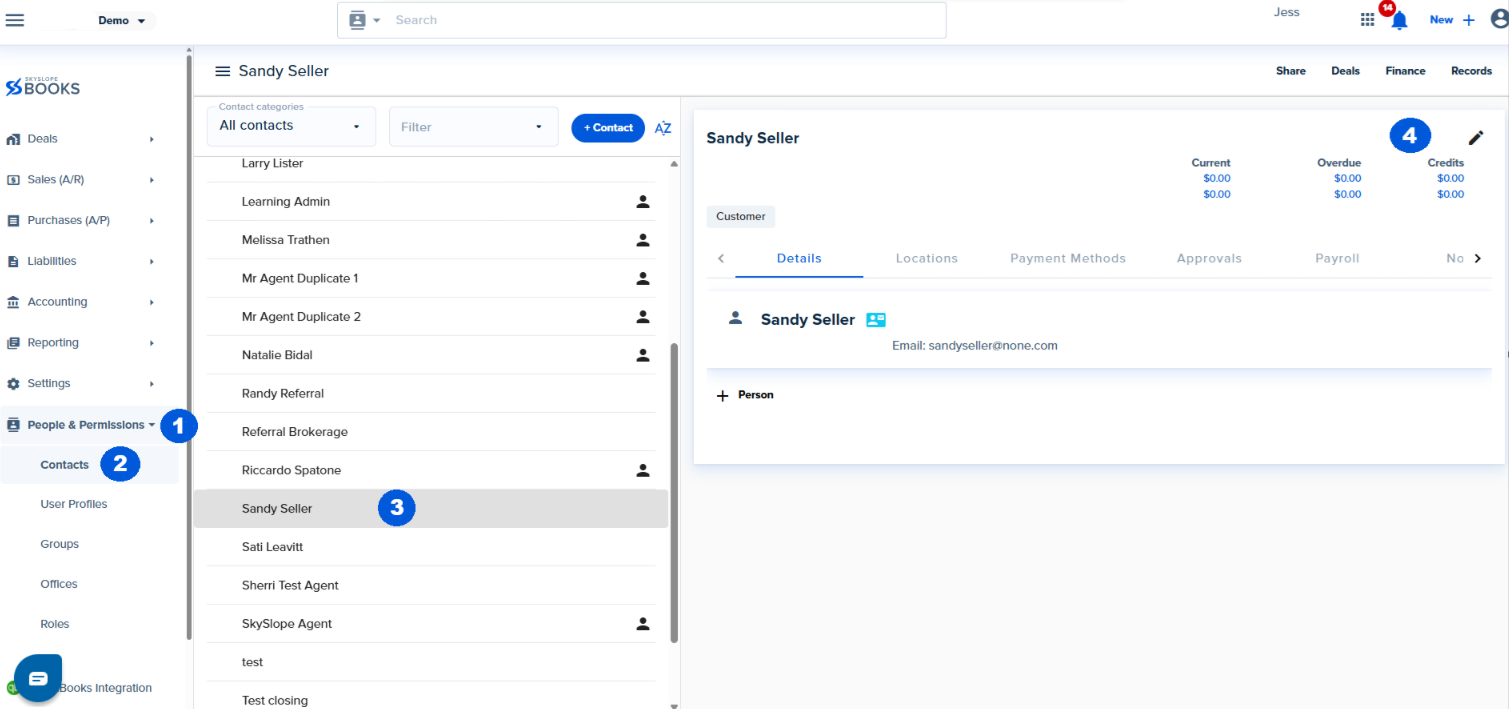
4. Once you're on the Edit Contact page, navigate to the Payroll tab.

5. Locate the field labeled Opening 1099 Value.

6. Enter the appropriate beginning balance for the contact's 1099.

Opening 1099 2.png

Was this article helpful?

That’s Great!

Thank you for your feedback

Sorry! We couldn't be helpful

Thank you for your feedback

Let us know how can we improve this article!

Select at least one of the reasons
CAPTCHA verification is required.

Feedback sent

We appreciate your effort and will try to fix the article


<\br>