The My Business portal provides agents with a way to view and pay invoices in the SkySlope Books platform. To enable your agent’s access to their My Business portal, follow the steps below:
Note: If you have not created a User Profile for the agent, follow the steps in the How to Add and Manage User Profiles article to create the user profile and add the My Business portal.
How to Enable an Agent's MyBusiness Portal
1. In the left navigation menu, go to People & Permissions
2. Select User Profiles. This will take you to the User Profiles page.
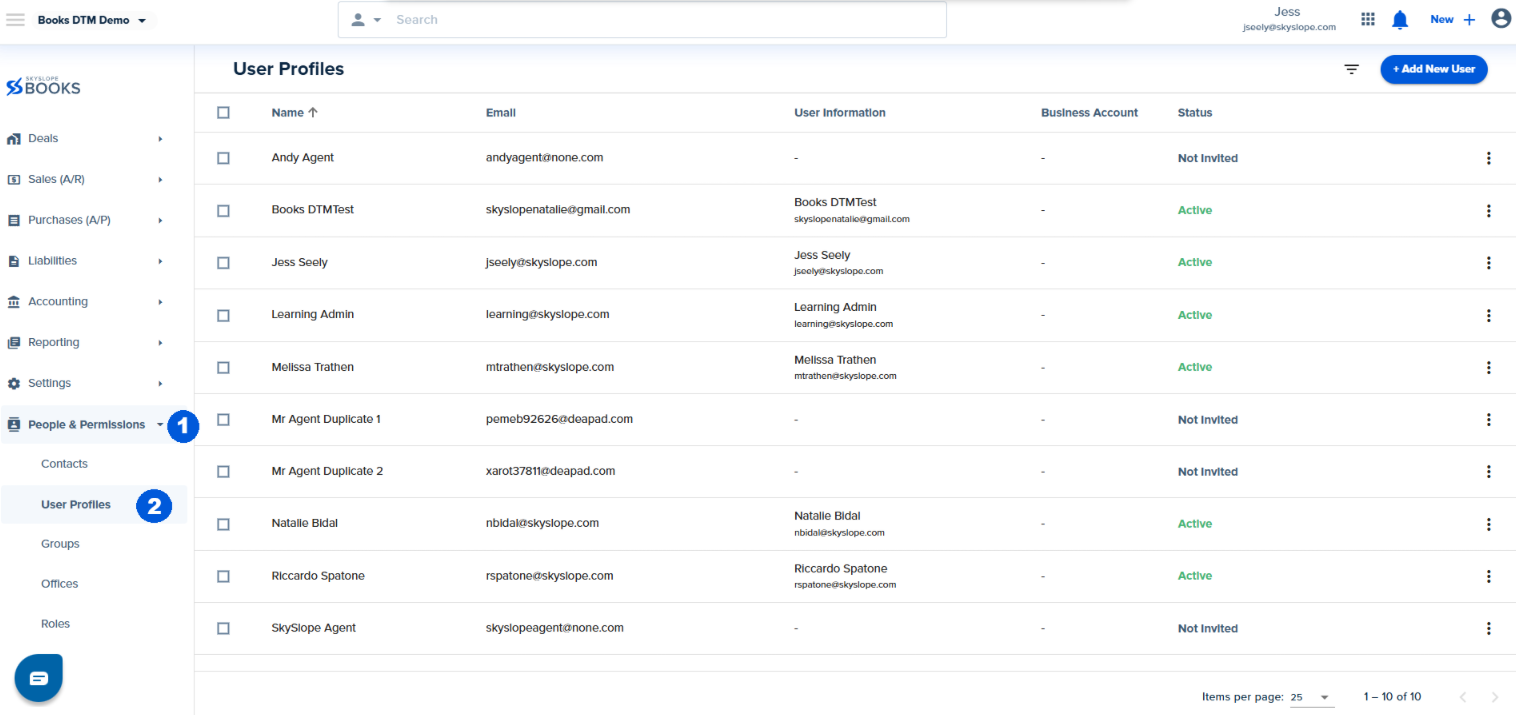
4. Find the agent for whom want to enable My Business for and click the overflow menu. If you haven't already clicked "Send Invitation" select this option first.

5. Check the box to Create 'My Business' portal.
6. Click Save.
Important: The Create My Business portal option will only be visible for User Profiles that have been invited to SkySlope Books.

Your agent will now be invited to their own My Business account!
Was this article helpful?
That’s Great!
Thank you for your feedback
Sorry! We couldn't be helpful
Thank you for your feedback
Feedback sent
We appreciate your effort and will try to fix the article
<\br>