After a user profile is created, you have the option to Revoke Access (if and invite was sent), Suspend or Delete. There are important differences between these three options.
Accessing Revoke Access, Deactivate and Delete
1. In the left menu, navigate to People & Permissions. Then, go to the User Profiles section.

2. Click on the actions menu icon  and then select the appropriate option for the circumstance.
The options to Revoke Access and Deactivate are also in the Edit Profile section.
1. In the left menu, navigate to People & Permissions. Then, go to the User Profiles section.
2. Click on the actions menu icon and then select Edit

3. Click on Actions on the bottom right hand corner of the section to access Revoke Access and Deactivate.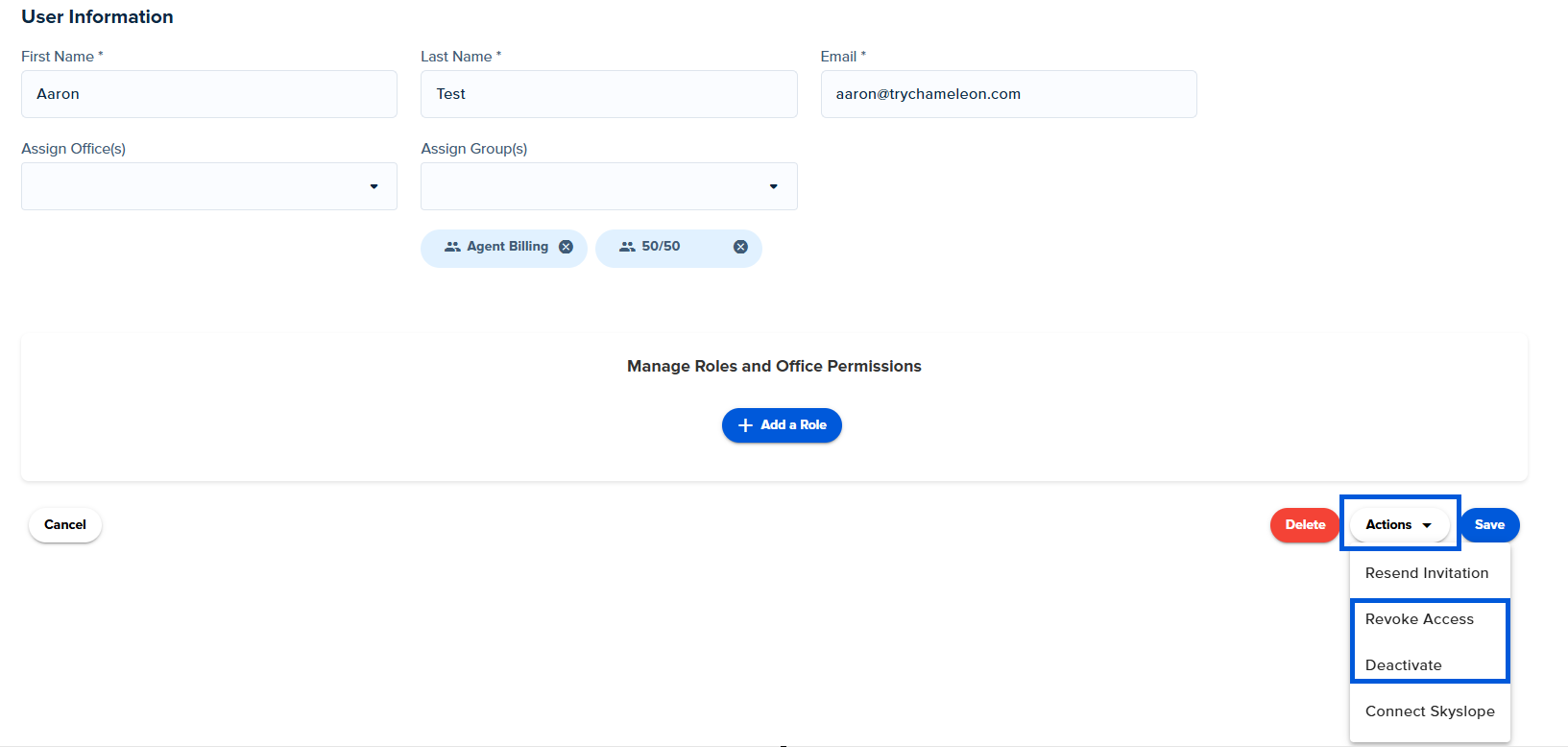
Revoke Access vs. Suspend vs. Delete
Revoke Access: Recommended
Use this option if you have previously given a user access but no longer want them to have access to SkySlope Books
- The user can no longer log into Books
- Revoking access will not impact any existing or new deals in the system
- They will still be visible in the User Profile and Contact screen
- User will still be associated with Groups, Offices, and Commission Plans
- Access can be easily given again by resending the invitation
Deactivate: Use with caution - see important notes below
Use this option if you would like to revoke access and remove the agent from all groups, offices and commission plans.
Important: They will be removed from commission plans.
- If a change is made to a deal and the deal is saved, the commission will no longer calculate after the user profile has been suspended
- It is recommended that you wait until all deals have been processed before you suspend the account
- Once a user is deactivated in User Profiles, it will still be visible in the User Profile screen, however, it will show that it is deactivated
- The user will be deleted from Groups and Offices
- The user will remain in the Contacts screen, therefore, reporting will still be available
- The user can no longer log into (if they were given access)
- Note: A deactivated user profile can be reactivated - Resend the invite and then select "Reactivate" from the dropdown
Delete: Use with caution - see important notes below
Use this option to delete a user profile from Books completely
Important: User Profiles that are associated with any deals (closed, processed, pending, etc.) can not be deleted.
- Once a user is deleted in User Profiles, it will no longer be visible in the User Profile screen, Contacts and any Groups / Offices they were assigned to
- This option is typically used for admin users that aren't associated with deals in Books.
Was this article helpful?
That’s Great!
Thank you for your feedback
Sorry! We couldn't be helpful
Thank you for your feedback
Feedback sent
We appreciate your effort and will try to fix the article
<\br>