The Average Commission Widget shows you an overview of your average commission by deal status and/or type for the current week, month, quarter, year, or a custom date range.
Getting Started
1. Under the Reporting module, navigate to the Dashboard you want to customize.
2. Click Edit Dashboard. Then click the + icon under Add Widget.
3. Select the Widget Type. In this article, we will go over creating the Average Commission Widget.
Required Fields for the Widget
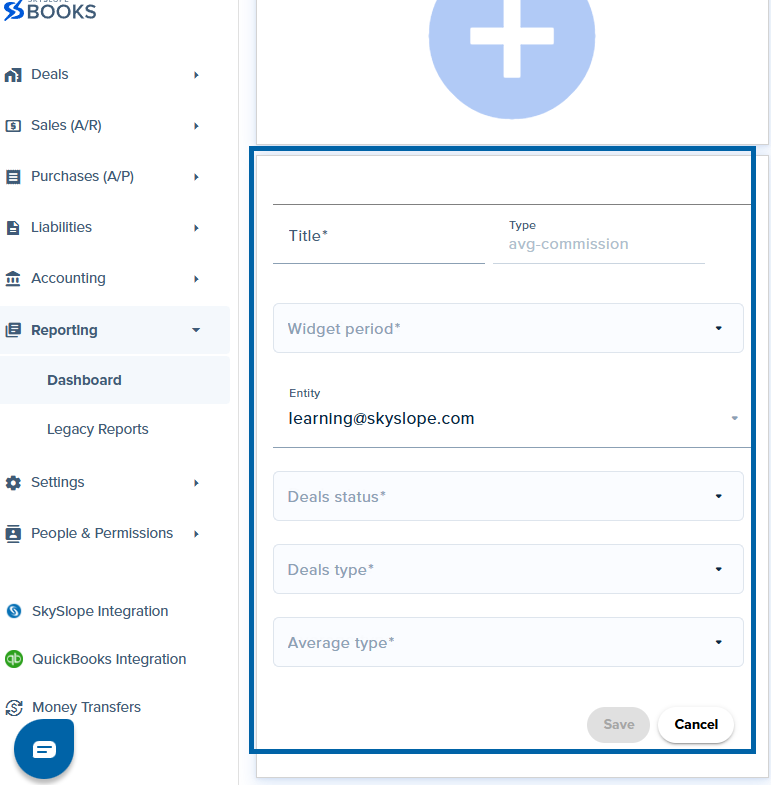
- Title: The title you want to name your widget for your Insights board
- Widget Period: You can choose from:
- Current week
- Current quarter
- Current month
- Current year
- Custom date
- Entity: The Profile you want to see the data for. By default, it populates to the signed-in user. You can change it to company or custom.
- Deal Status: You can choose one or multiple deal statuses from the available SkySlope Books statuses
- Deal Type: You can choose one or multiple deal types from the available SkySlope Books deal types
- Average Type: You can choose GCI, percentage, or both.
Fill out all of the required fields listed above for the widget, and then click Save.
What does the widget show?

Based on the fields selected (person, office, time period, etc.), this widget will show the average commission.
Note: The widget takes into consideration all the deals the selected contacts are a part of, whether they are the primary agent, just an agent, or even a financial transfer.
Was this article helpful?
That’s Great!
Thank you for your feedback
Sorry! We couldn't be helpful
Thank you for your feedback
Feedback sent
We appreciate your effort and will try to fix the article
<\br>